> ## Documentation Index
> Fetch the complete documentation index at: https://docs.ogify.dev/llms.txt
> Use this file to discover all available pages before exploring further.
# basic
The `basic` template is a production-ready, highly customizable JSX template that supports three layouts, HTML subtitles via `htmlSnippet`, and full RTL support.
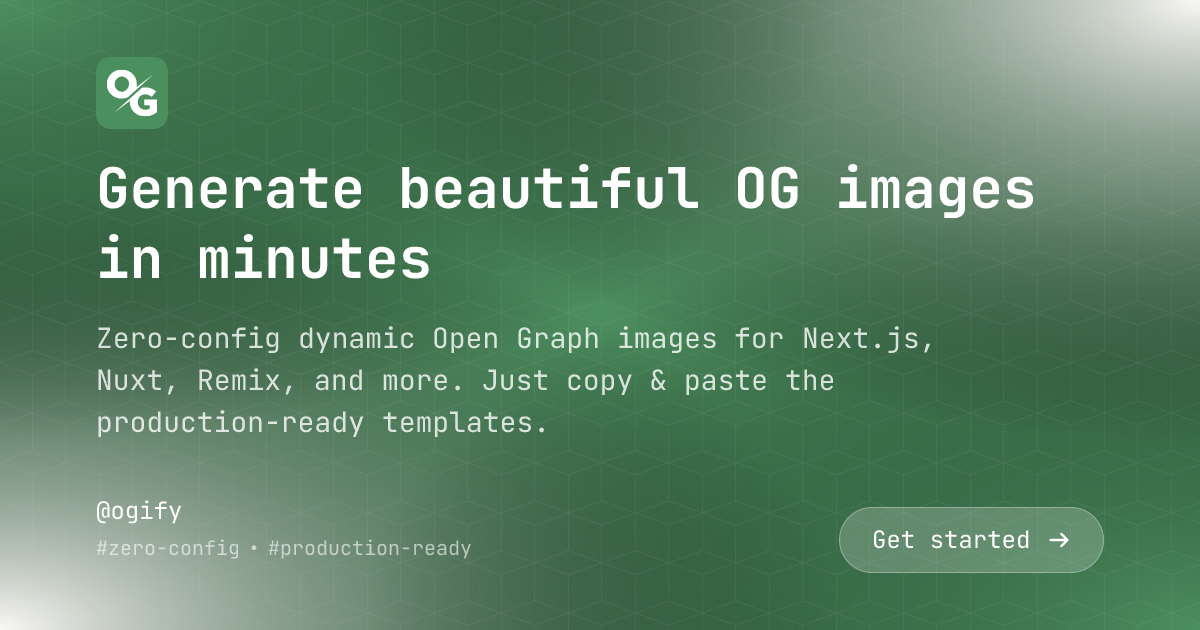 ## Import
```typescript theme={null}
import template from "@ogify/templates/basic";
import type { TemplateParams } from "@ogify/templates/basic";
```
## Parameters
The main heading text. Supports plain text or trusted inline HTML via
[`htmlSnippet`](/api-reference/core/html-snippet).
Optional subtitle or description text. Supports plain text or trusted inline HTML
via [`htmlSnippet`](/api-reference/core/html-snippet) — use `` for
styled words (e.g. `Zero-config dynamic OG images`).
Your brand or company name
URL to your brand logo image
Call-to-action text (e.g., "Read More", "Learn More")
Additional metadata items (e.g., date, author, reading time)
Layout style for the template
Primary color for gradients and background
Secondary color for gradients
Text color
Background pattern image URL
## Layouts
Left-aligned layout (or right-aligned for RTL) with brand logo at the top and metadata at the bottom.
```typescript theme={null}
const buffer = await renderer.renderToImage('basic', {
title: 'Getting Started with OGify',
subtitle: 'Learn how to generate beautiful Open Graph images',
brandName: 'OGify',
brandLogo: 'https://example.com/logo.png',
layout: 'aligned',
extras: ['5 min read', 'Jan 12, 2026'],
});
```
Center-aligned layout with all content centered on the canvas.
```typescript theme={null}
const buffer = await renderer.renderToImage('basic', {
title: 'Welcome to Our Platform',
subtitle: 'Build amazing things together',
brandName: 'Platform',
layout: 'centered',
cta: 'Get Started',
});
```
Two-column layout with brand info on one side and content on the other.
```typescript theme={null}
const buffer = await renderer.renderToImage('basic', {
title: 'Advanced Features',
subtitle: 'Discover what makes us different',
brandName: 'Product',
brandLogo: 'https://example.com/logo.png',
layout: 'split',
extras: ['Feature 1', 'Feature 2', 'Feature 3'],
});
```
## Examples
```typescript Basic Usage theme={null}
import { createRenderer } from "@ogify/core";
import template from "@ogify/templates/basic";
import type { TemplateParams } from "@ogify/templates/basic";
const renderer = createRenderer<{ basic: TemplateParams }>({
templates: { basic: template },
});
const buffer = await renderer.renderToImage("basic", {
title: "Hello World",
subtitle: "My first OG image",
layout: "centered",
});
```
```typescript With Branding theme={null}
const buffer = await renderer.renderToImage("basic", {
title: "Product Launch 2026",
subtitle: "Introducing our latest innovation",
brandName: "Acme Corp",
brandLogo: "https://acme.com/logo.png",
layout: "aligned",
primaryColor: "#0066cc",
secondaryColor: "#e6f2ff",
extras: ["Tech", "Innovation"],
});
```
```typescript With CTA theme={null}
const buffer = await renderer.renderToImage("basic", {
title: "Join Our Community",
subtitle: "Connect with thousands of developers",
cta: "Sign Up Now",
layout: "centered",
primaryColor: "#8b5cf6",
textColor: "#ffffff",
});
```
```typescript With HTML Subtitle theme={null}
const buffer = await renderer.renderToImage("basic", {
title: "Generate beautiful OG images",
subtitle:
'Zero-config dynamic OG images for Next.js, Nuxt, and Remix.',
layout: "aligned",
});
```
```typescript RTL Support theme={null}
const buffer = await renderer.renderToImage(
"basic",
{
title: "مرحبا بالعالم",
subtitle: "هذه أول صورة OG لي",
brandName: "شركة",
layout: "aligned",
},
{
isRTL: true,
}
);
```
```typescript Custom Colors & Pattern theme={null}
const buffer = await renderer.renderToImage("basic", {
title: "Custom Design",
subtitle: "Fully customizable appearance",
layout: "split",
primaryColor: "#ff6b6b",
secondaryColor: "#4ecdc4",
textColor: "#ffffff",
pattern: "https://example.com/custom-pattern.png",
});
```
## Fonts
The basic template uses **JetBrains Mono** font in two weights:
* Regular (400)
* Bold (700)
## Features
Title and subtitle accept trusted inline HTML. Styled words render correctly
without raw tags showing — powered by `htmlSnippet` under the hood.
Fully supports right-to-left languages. Pass `isRTL: true` in the options to enable RTL layout.
{" "}
Control primary color, secondary color, and text color to match your brand.
{" "}
Choose from aligned, centered, or split layouts depending on your content
needs.
{" "}
Add visual interest with customizable background patterns.
Include a prominent CTA button with automatic arrow icons that flip for RTL.
## Tips
Use the `extras` array to display metadata like reading time, date, category,
or author information.
The template automatically adjusts text size based on whether a subtitle is
present - titles are larger when there's no subtitle.
Background gradients are created using radial gradients from the corners,
creating a modern, dynamic look.
## Import
```typescript theme={null}
import template from "@ogify/templates/basic";
import type { TemplateParams } from "@ogify/templates/basic";
```
## Parameters
The main heading text. Supports plain text or trusted inline HTML via
[`htmlSnippet`](/api-reference/core/html-snippet).
Optional subtitle or description text. Supports plain text or trusted inline HTML
via [`htmlSnippet`](/api-reference/core/html-snippet) — use `` for
styled words (e.g. `Zero-config dynamic OG images`).
Your brand or company name
URL to your brand logo image
Call-to-action text (e.g., "Read More", "Learn More")
Additional metadata items (e.g., date, author, reading time)
Layout style for the template
Primary color for gradients and background
Secondary color for gradients
Text color
Background pattern image URL
## Layouts
Left-aligned layout (or right-aligned for RTL) with brand logo at the top and metadata at the bottom.
```typescript theme={null}
const buffer = await renderer.renderToImage('basic', {
title: 'Getting Started with OGify',
subtitle: 'Learn how to generate beautiful Open Graph images',
brandName: 'OGify',
brandLogo: 'https://example.com/logo.png',
layout: 'aligned',
extras: ['5 min read', 'Jan 12, 2026'],
});
```
Center-aligned layout with all content centered on the canvas.
```typescript theme={null}
const buffer = await renderer.renderToImage('basic', {
title: 'Welcome to Our Platform',
subtitle: 'Build amazing things together',
brandName: 'Platform',
layout: 'centered',
cta: 'Get Started',
});
```
Two-column layout with brand info on one side and content on the other.
```typescript theme={null}
const buffer = await renderer.renderToImage('basic', {
title: 'Advanced Features',
subtitle: 'Discover what makes us different',
brandName: 'Product',
brandLogo: 'https://example.com/logo.png',
layout: 'split',
extras: ['Feature 1', 'Feature 2', 'Feature 3'],
});
```
## Examples
```typescript Basic Usage theme={null}
import { createRenderer } from "@ogify/core";
import template from "@ogify/templates/basic";
import type { TemplateParams } from "@ogify/templates/basic";
const renderer = createRenderer<{ basic: TemplateParams }>({
templates: { basic: template },
});
const buffer = await renderer.renderToImage("basic", {
title: "Hello World",
subtitle: "My first OG image",
layout: "centered",
});
```
```typescript With Branding theme={null}
const buffer = await renderer.renderToImage("basic", {
title: "Product Launch 2026",
subtitle: "Introducing our latest innovation",
brandName: "Acme Corp",
brandLogo: "https://acme.com/logo.png",
layout: "aligned",
primaryColor: "#0066cc",
secondaryColor: "#e6f2ff",
extras: ["Tech", "Innovation"],
});
```
```typescript With CTA theme={null}
const buffer = await renderer.renderToImage("basic", {
title: "Join Our Community",
subtitle: "Connect with thousands of developers",
cta: "Sign Up Now",
layout: "centered",
primaryColor: "#8b5cf6",
textColor: "#ffffff",
});
```
```typescript With HTML Subtitle theme={null}
const buffer = await renderer.renderToImage("basic", {
title: "Generate beautiful OG images",
subtitle:
'Zero-config dynamic OG images for Next.js, Nuxt, and Remix.',
layout: "aligned",
});
```
```typescript RTL Support theme={null}
const buffer = await renderer.renderToImage(
"basic",
{
title: "مرحبا بالعالم",
subtitle: "هذه أول صورة OG لي",
brandName: "شركة",
layout: "aligned",
},
{
isRTL: true,
}
);
```
```typescript Custom Colors & Pattern theme={null}
const buffer = await renderer.renderToImage("basic", {
title: "Custom Design",
subtitle: "Fully customizable appearance",
layout: "split",
primaryColor: "#ff6b6b",
secondaryColor: "#4ecdc4",
textColor: "#ffffff",
pattern: "https://example.com/custom-pattern.png",
});
```
## Fonts
The basic template uses **JetBrains Mono** font in two weights:
* Regular (400)
* Bold (700)
## Features
Title and subtitle accept trusted inline HTML. Styled words render correctly
without raw tags showing — powered by `htmlSnippet` under the hood.
Fully supports right-to-left languages. Pass `isRTL: true` in the options to enable RTL layout.
{" "}
Control primary color, secondary color, and text color to match your brand.
{" "}
Choose from aligned, centered, or split layouts depending on your content
needs.
{" "}
Add visual interest with customizable background patterns.
Include a prominent CTA button with automatic arrow icons that flip for RTL.
## Tips
Use the `extras` array to display metadata like reading time, date, category,
or author information.
The template automatically adjusts text size based on whether a subtitle is
present - titles are larger when there's no subtitle.
Background gradients are created using radial gradients from the corners,
creating a modern, dynamic look.