> ## Documentation Index
> Fetch the complete documentation index at: https://docs.ogify.dev/llms.txt
> Use this file to discover all available pages before exploring further.
# RTL Support
> Right-to-left language support for Arabic, Hebrew, and Persian
OGify has built-in support for Right-to-Left (RTL) languages like Arabic, Hebrew, and Persian.
## Enabling RTL
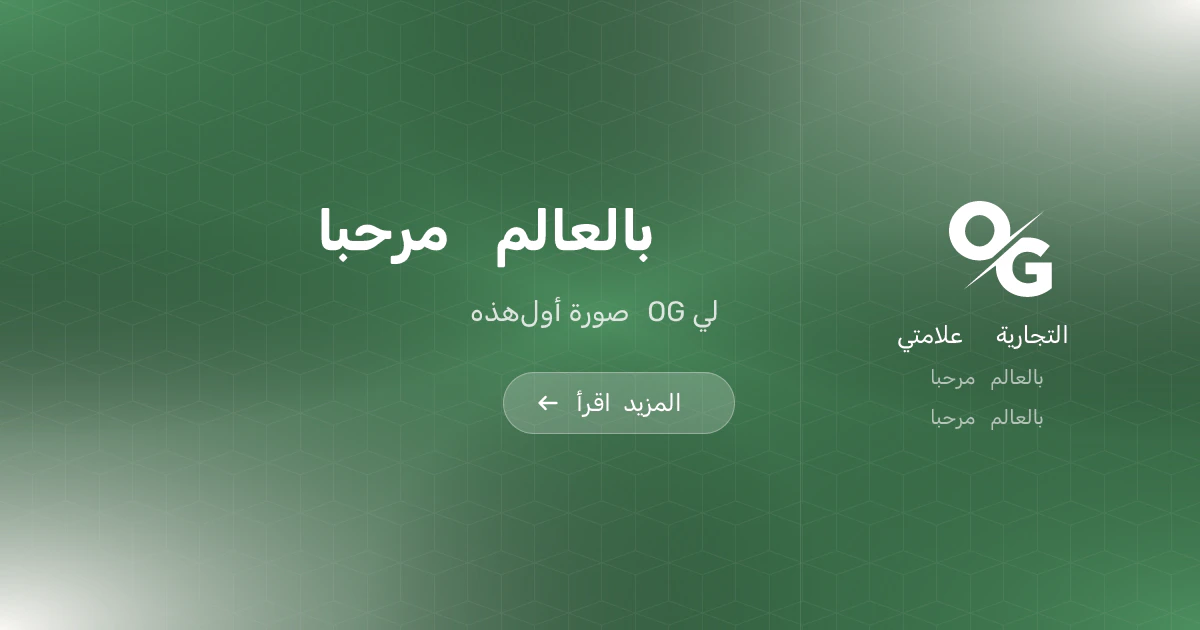
To enable RTL support, simply pass `isRTL: true` in the options object when calling `renderToImage`.
```typescript theme={null}
const imageBuffer = await renderer.renderToImage(
"basic",
{
title: "مرحبا بالعالم", // Arabic: Hello World
subtitle: "هذه أول صورة OG لي",
layout: "split",
cta: "اقرأ المزيد",
extras: ["مرحبا بالعالم", "مرحبا بالعالم"],
brandName: "علامتي التجارية",
},
{
isRTL: true,
fonts: [
{
name: "Rubik",
weight: 400,
},
{
name: "Rubik",
weight: 700,
},
],
}
);
```
To display the text correctly, you must use a font that supports the specific
language characters. We recommend checking [Google
Fonts](https://fonts.google.com/?lang=ar_Arab) for a wide selection of
compatible fonts.
 ## Template Support
All built-in templates (like `basic`) fully support RTL. In custom JSX templates, use `isRTL` with [`clsx`](/api-reference/core/clsx) for conditional layout:
```tsx theme={null}
renderer: ({ params, isRTL }) => (
),
```
Always test your templates with RTL content to ensure proper layout and text
alignment.
## Template Support
All built-in templates (like `basic`) fully support RTL. In custom JSX templates, use `isRTL` with [`clsx`](/api-reference/core/clsx) for conditional layout:
```tsx theme={null}
renderer: ({ params, isRTL }) => (
),
```
Always test your templates with RTL content to ensure proper layout and text
alignment.